こちらの続きです。
カスタムテーブルにアクセスする - C#ATIA
前回のコードを試したところ、正しいカスタムテーブルの数を返してくれませんでしたが、
今回試したところ、正しい値を返すようになりました。
そこで今回はもう一歩進めます。
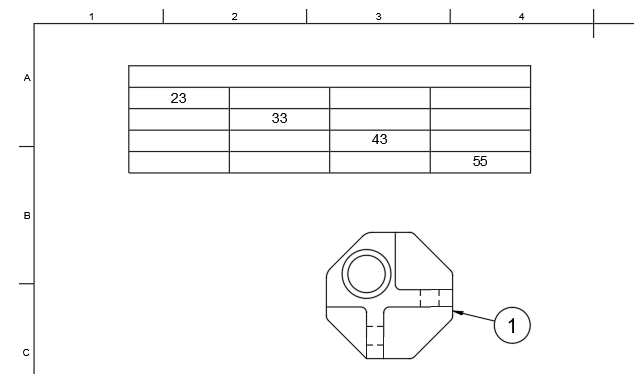
カスタムテーブルを1個作成し、適当にセルに値を入力しておきます。
続いて、セルの値を出力するためのコードを作成しました。
# Fusion360API Python script

import traceback

import adsk.core as core
import adsk.drawing as drawing


def run(context):
    ui: core.UserInterface = None
    try:
        app: core.Application = core.Application.get()
        ui = app.userInterface

        drawDoc: drawing.DrawingDocument = drawing.DrawingDocument.cast(
            app.activeDocument
        )
        if not drawDoc:
            return

        draw: drawing.Drawing = drawDoc.drawing
        sheet: drawing.Sheet = draw.activeSheet
        table: drawing.CustomTable = sheet.customTables[0]
        for row in range(table.rowCount):
            for col in range(table.columnCount):
                cell_data = table.getCellData(row, col)
                print(f"[{row}, {col}] = {cell_data}")

    except Exception:
        if ui:
            ui.messageBox("Failed:\n{}".format(traceback.format_exc()))
実行結果は、この様になりました。
[0, 0] =
[0, 1] =
[0, 2] =
[0, 3] =
[1, 0] =
[1, 1] =
[1, 2] =
[1, 3] =
[2, 0] =
[2, 1] =
[2, 2] =
[2, 3] =
[3, 0] =
[3, 1] =
[3, 2] =
[3, 3] =
[4, 0] =
[4, 1] =
[4, 2] =
[4, 3] =
どうも、未だに機能していないようです・・・。書き込みのsetCellDataメソッドも機能していませんでした。
